
What is A2A in Zero?
Zero A2A is a practical form of agent-to-agent communication inside the product. It lets one agent open several isolated chats, lets a coordinator delegate bounded work to specialist agents, and lets you type @ in the chat composer to bring an existing chat into a comparison, handoff, or decision.
This is useful when a job is too broad, noisy, or risky for one long conversation. Instead of asking one agent to hold every test, source, and decision in the same context, you give each piece of work a clear home and bring back only the evidence that matters.
Three ways A2A works in Zero
| What you want to do | Use this setup | A good first scenario |
|---|---|---|
| Repeat one method with clean context | One agent, several chats | Test signup, billing, permissions, and mobile separately |
| Give parts of a job to different experts | One coordinator, several specialist agents or subagents | Split a launch across research, browser QA, writing, and publishing |
| Reuse work that already exists | @ another chat in the composer | Compare two QA reports or pass research into a writing task |
Three product objects sit behind these patterns:
- An agent is the reusable worker. It owns instructions, workflows, connectors, permissions, tone, role, and model choice.
- A chat is one isolated conversation with an agent. It keeps a test, review, or production task in its own context.
- A run is one active response inside a chat. Runs do the work and may wait when the workspace reaches its concurrency limit.
The important detail is simple: a new child chat does not inherit the full history of the control chat. Its first message should include everything it needs to do the job.
A2A, multiple chats, subagents, workflows, and automations
These terms solve different problems. Use the smallest setup that gives you the boundary you need.
| Product pattern | What it changes | Best used for |
|---|---|---|
| A2A in Zero | How agents and chats coordinate work | Delegation, comparison, handoffs, and final synthesis |
| Multiple chats under one agent | Context, while instructions and permissions stay the same | Parallel testing, localization checks, research batches, and model evaluations |
| Specialist agents or subagents | Role, instructions, model, tools, or permissions | Research, QA, writing, data analysis, and controlled publishing |
| Workflow | A saved procedure an agent can repeat | A stable checklist or multi-step method |
| Automation | A trigger that starts a workflow with an agent | Scheduled reports, event-driven triage, and recurring checks |
A useful rule of thumb: split into chats when the method stays the same, split into specialist agents when the method or access changes, and use a workflow when the procedure should be repeated in the same way.
1. One agent opens several clean chats
You are about to ship. Signup, billing, permissions, and mobile all need a final pass. Putting every check into one long chat sounds convenient, but state can leak from one journey into the next. A billing upgrade can change the account before the permissions test even starts.
Use one chat per journey instead.
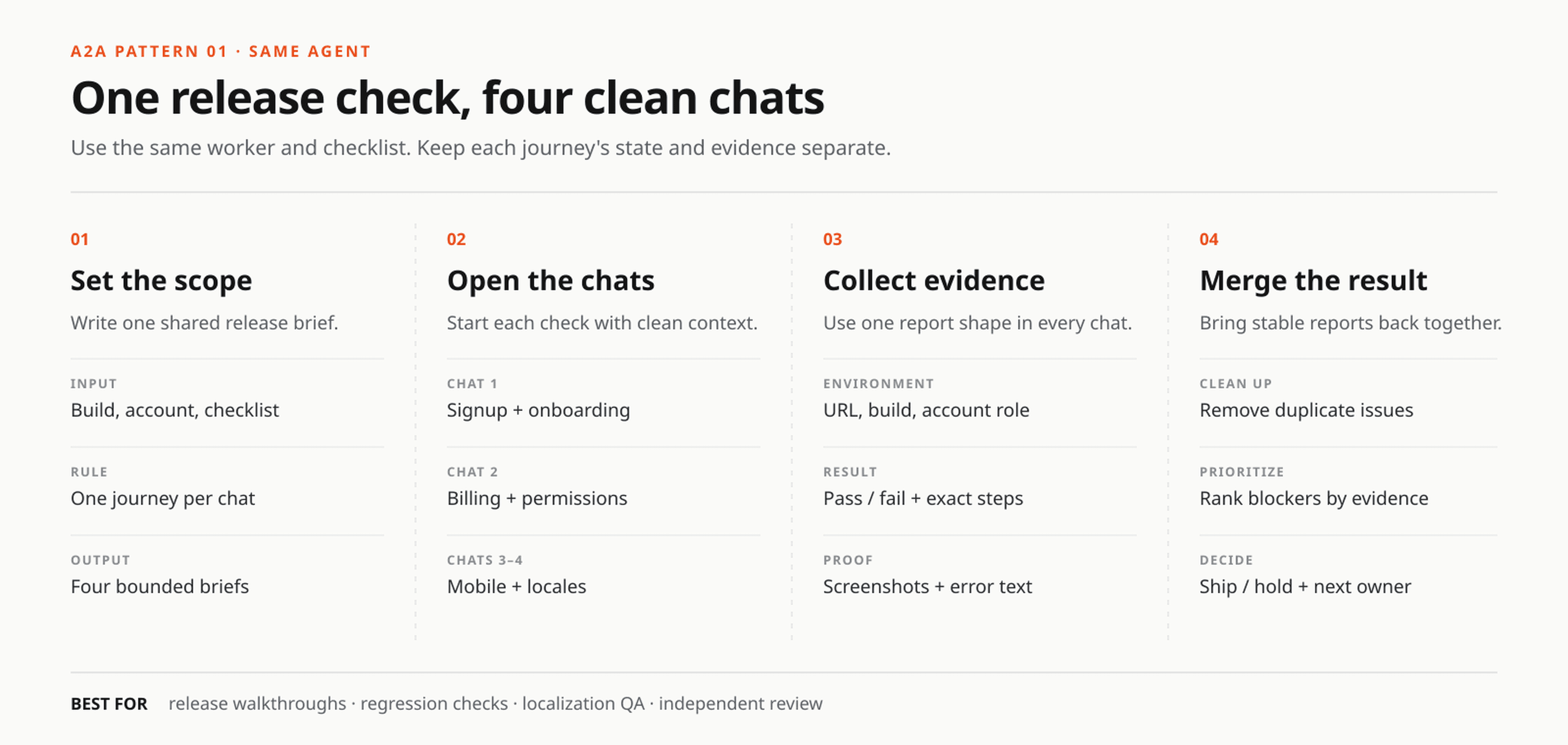
One shared brief, four isolated checks, then one final report.
We recreated this setup in the staging product on August 25, 2026. The same Zero agent opened four real chats for onboarding, billing, teammate permissions, and mobile plus locale testing.
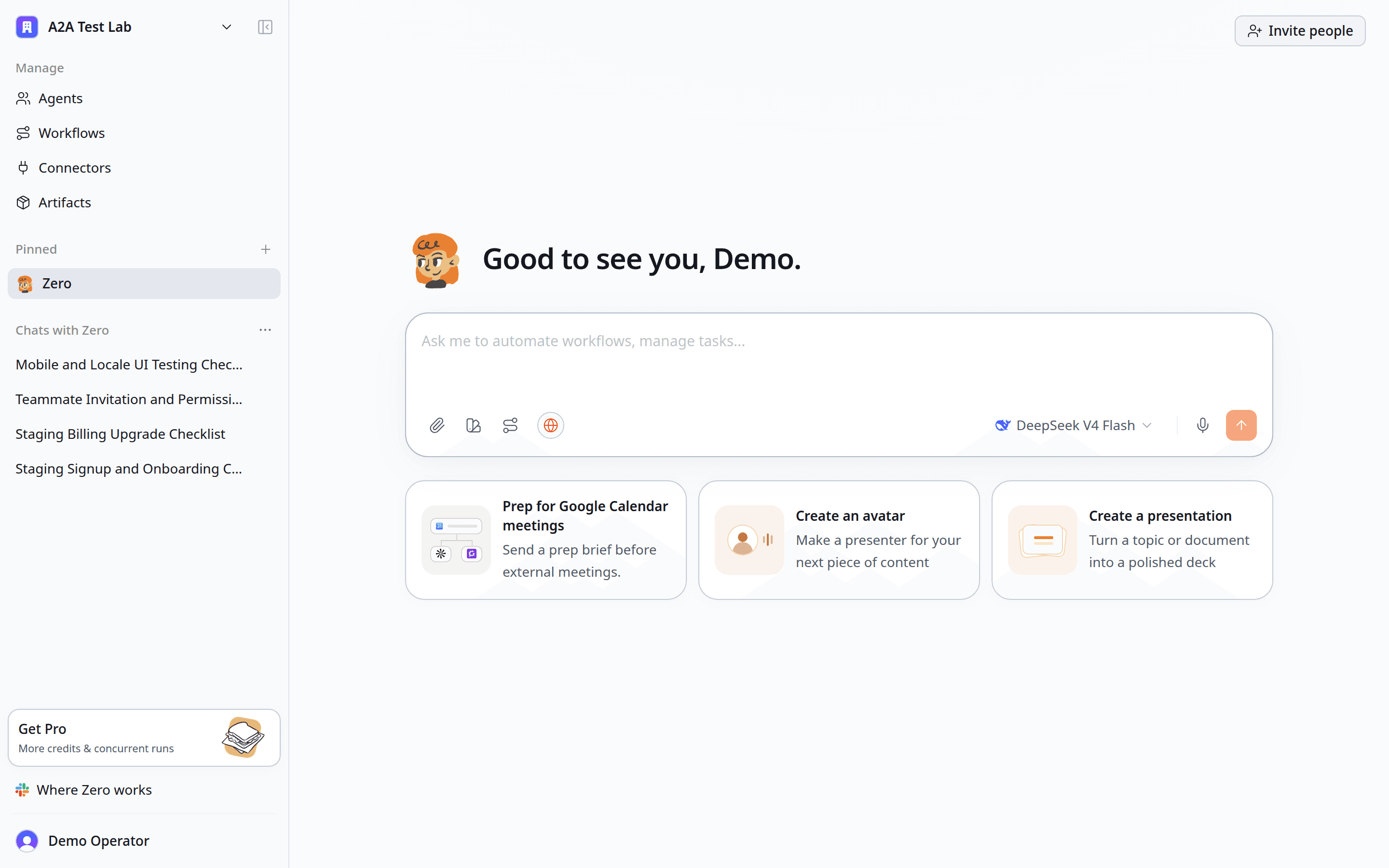
Each journey has its own chat, so the evidence stays easy to inspect.
Try this prompt:
Walk through this staging release as four separate jobs. Open one chat for signup and onboarding, one for billing upgrade, one for teammate invitation and denied permissions, and one for mobile plus locale checks. Use the same walkthrough agent for every chat. Each worker must return the URL tested, account role, numbered steps, screenshots, pass/fail status, and exact reproduction steps. Bring the results back here and group duplicate blockers.
This pattern also works for:
- One chat per browser or device size
- One chat per locale or account role
- One chat per pull request or feature flag
- One chat per reviewer, with findings kept separate until the end
- One chat per customer interview batch or research source set
- One chat per model when you want to compare outputs fairly
What usually goes wrong? The brief is too short. “Check billing” leaves the worker guessing about the account, build, expected result, and evidence format. Give every chat the same checklist and a separate test account when the flow changes shared data.
2. Use @ to bring another chat into the job
Sometimes the useful work already exists. A research chat has the customer quotes. A QA chat has the screenshots. A second review reaches a different conclusion. You do not need to copy and paste all of it.
Click the composer and type @. Zero opens a list of your existing chats.
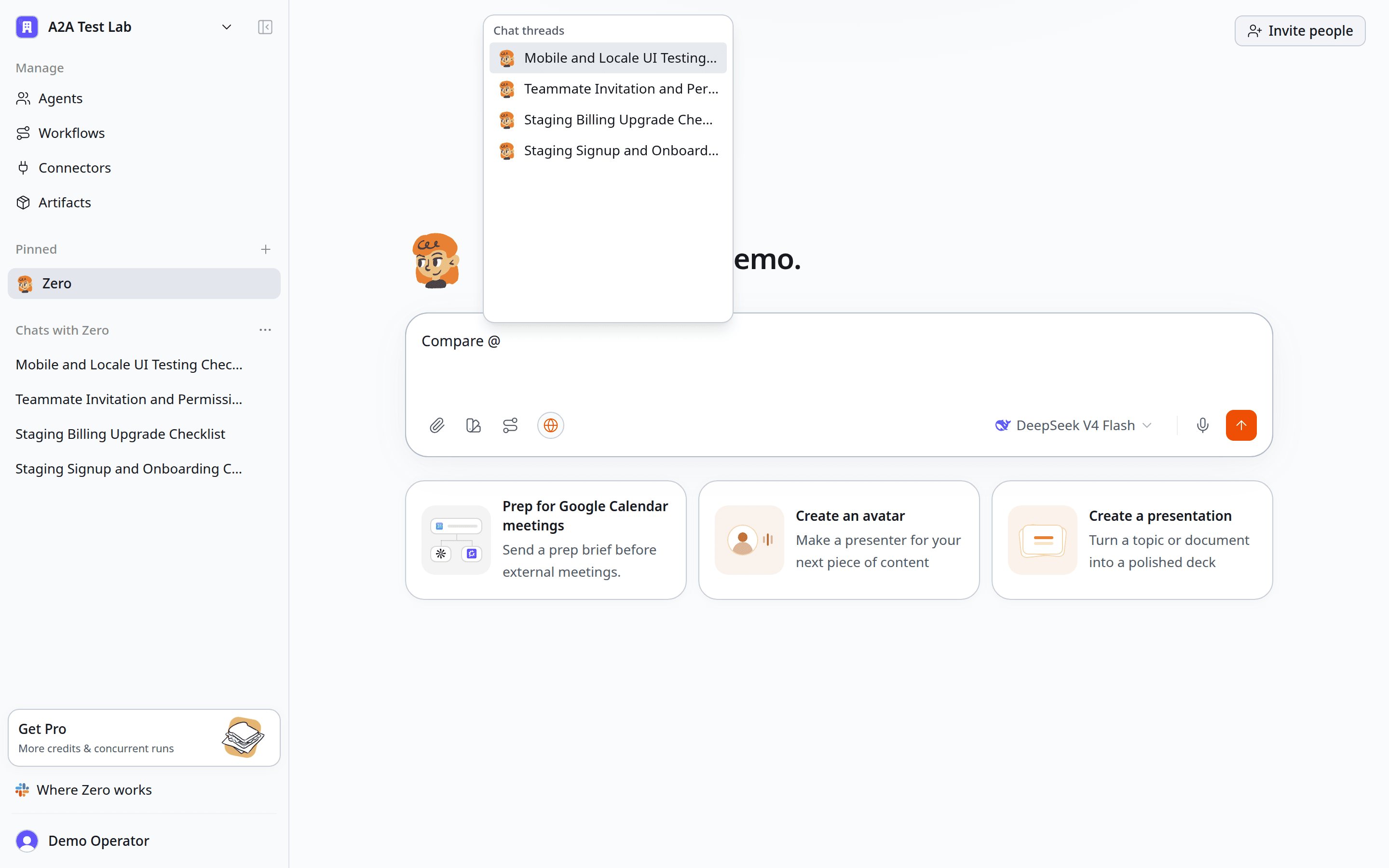
Start typing a title to narrow the list, then choose the chat you need.
The selected chat appears as a clickable orange chip.
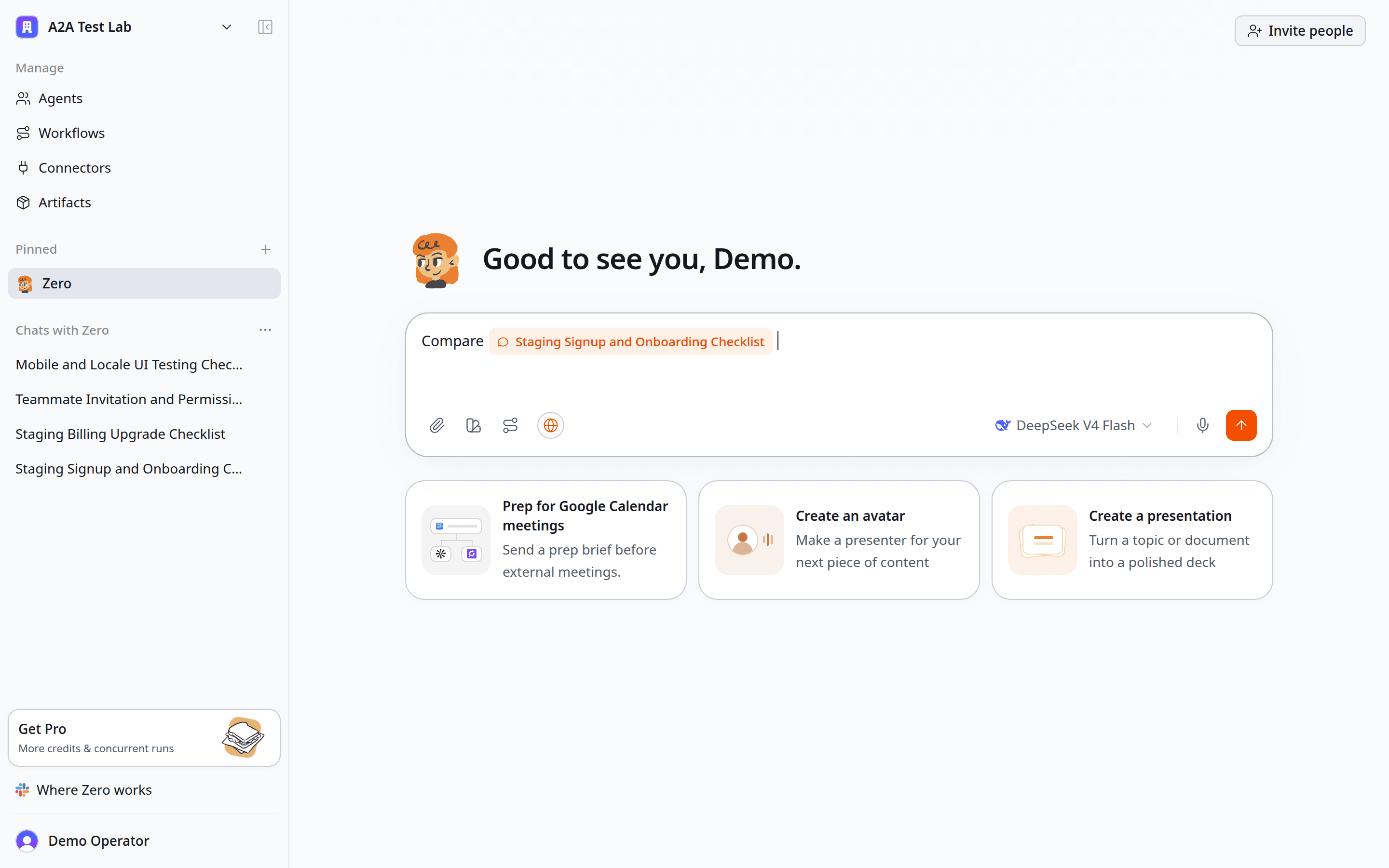
The chip points to the exact onboarding chat. The answer will be written in the current chat.
Then add a verb. Tell Zero what to do with that chat:
- “Compare
@Onboarding QAwith this billing review.” - “Continue from
@Customer research batch 2and write the recommendation here.” - “Challenge the highest-risk conclusion in
@Security review.” - “Turn the screenshots in
@Mobile walkthroughinto a bug report.” - “Extract every unresolved question from
@Launch research.”
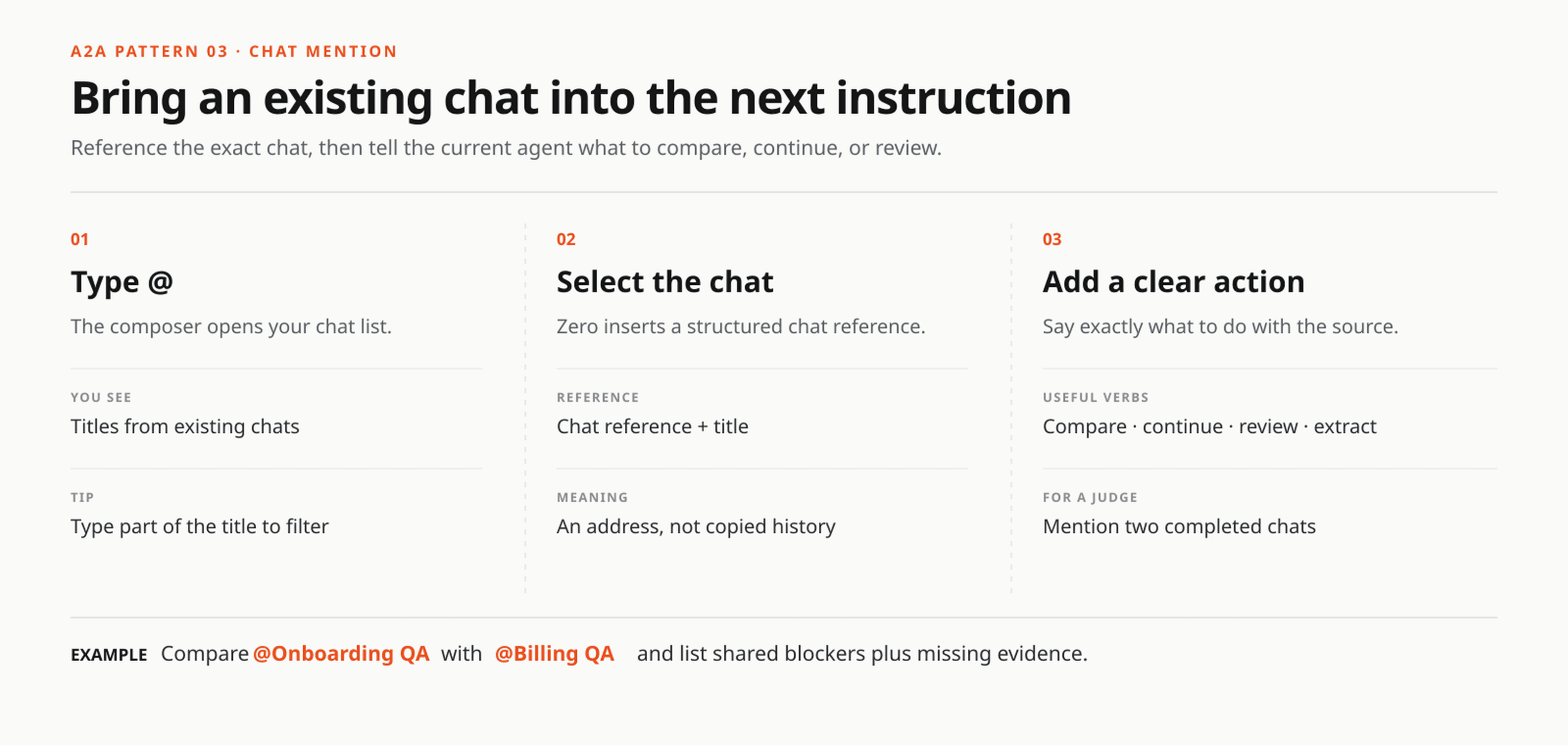
Type @, pick the chat, then say what you want Zero to do with it.
The mention is an address, not a vague text label. It points Zero to the selected chat without pasting the full conversation into the composer. That keeps the current message readable, but your instruction still needs a clear action. “Use this” is weak. “Compare the failed steps and rank the shared blockers” is clear.
3. Give different parts to specialist agents or subagents
Use several chats when you want clean copies of the same worker. Use specialist agents when the job needs different instructions, tools, models, or permission boundaries. A specialist agent doing a bounded assignment for a coordinator is often called a subagent.
A product launch is a good example. Research Scout can verify the evidence. Browser QA can check the shipped product. Launch Writer can draft the page. Publishing Operator can create the CMS draft after the claims pass review.
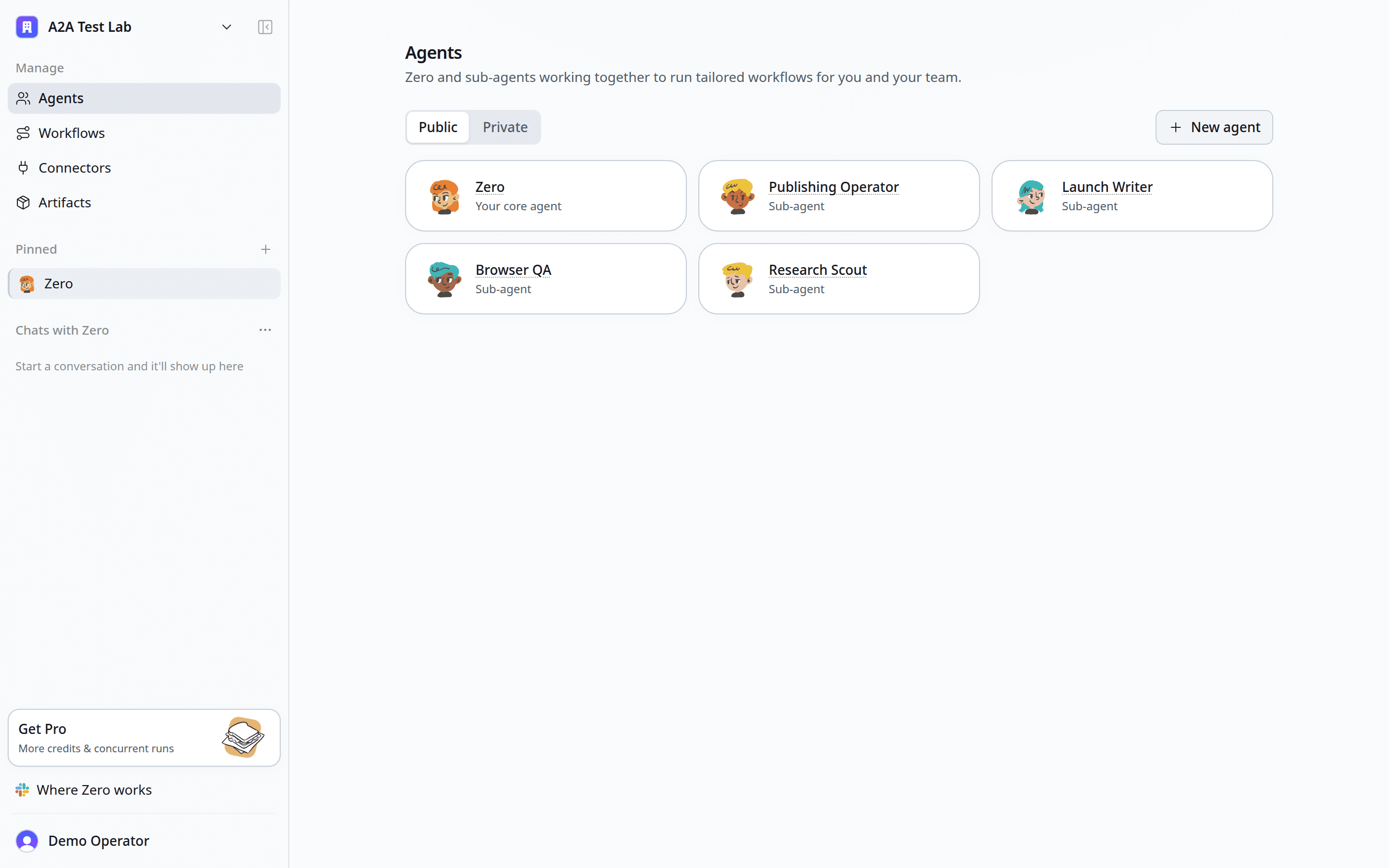
The staging workspace has one core agent and four named specialists, each ready for a bounded assignment.
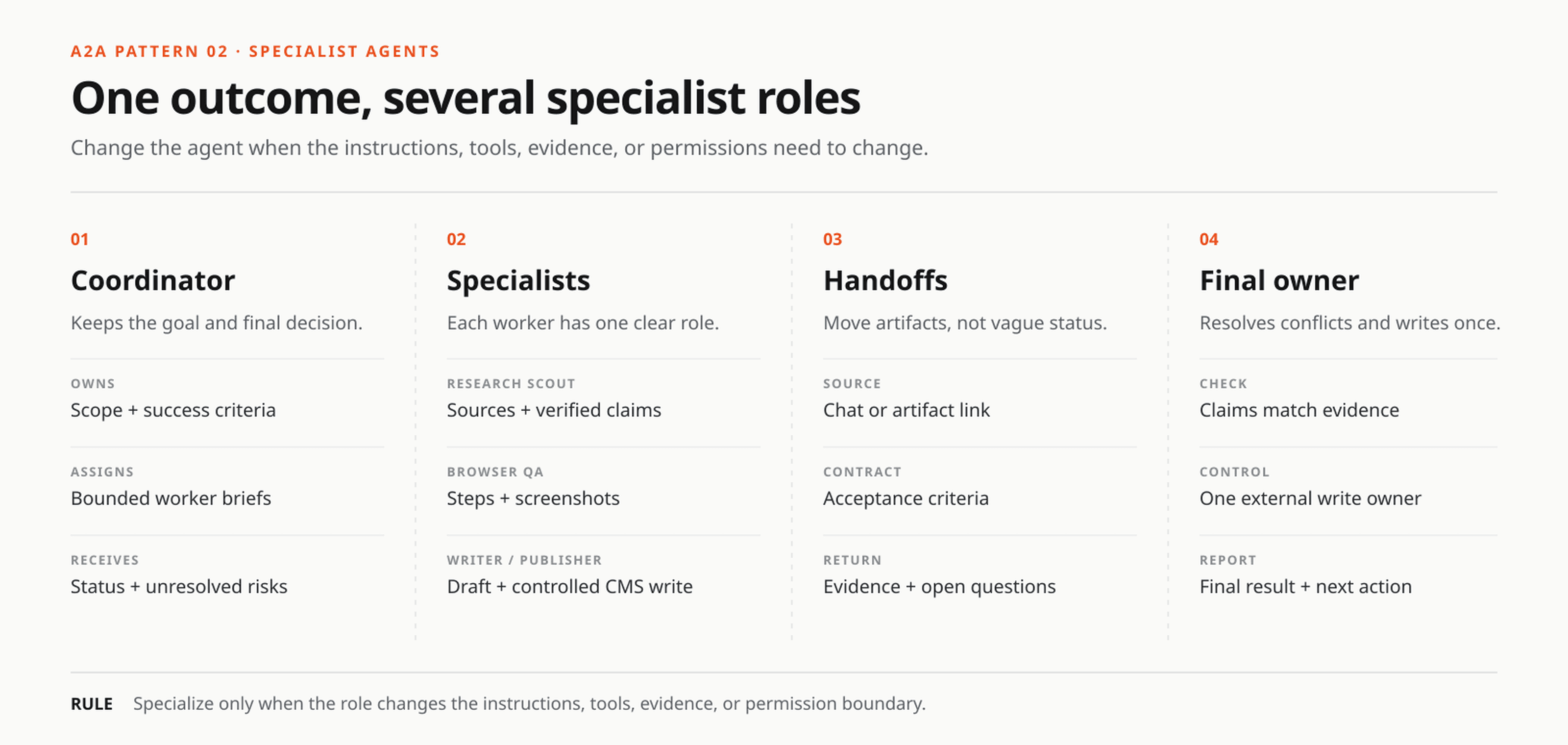
The coordinator owns the outcome. Specialists return evidence and artifacts, then one owner writes the final result.
Here is a practical launch brief:
Coordinate a launch package for Feature X. Ask Research Scout to verify the customer evidence and competitor claims. Ask Browser QA to reproduce every product claim in staging and attach screenshots. Ask Launch Writer to draft the page only after the evidence arrives. Publishing Operator may create the CMS draft, but must not publish it. Report missing evidence and conflicting claims in this chat.
The value comes from real boundaries. A research agent can stay read-only. A publishing agent can have draft access without publish permission. A QA agent can follow a fixed browser checklist every time. Zero's permission controls help keep those boundaries narrow.
Do not create specialists only to make the sidebar busier. Create one when the role changes how the work is done.
4. Let independent reviewers disagree, then use a judge
Two reviews are useful only when the second reviewer is not copying the first. Open clean chats, give both reviewers the same evidence, and keep their first reports separate.
Then start a judging chat and mention both reports in one prompt.
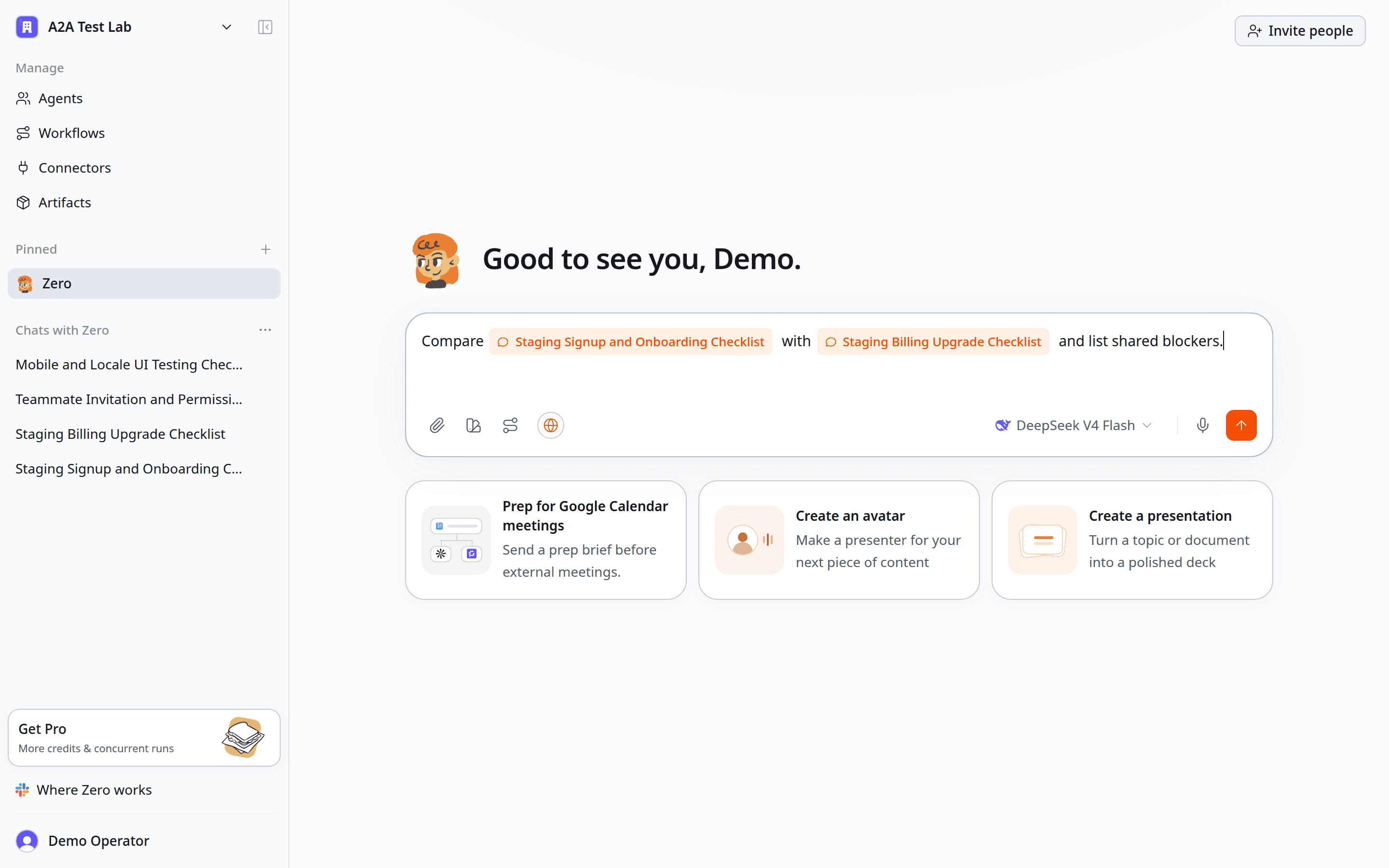
One prompt can reference two real QA chats and ask Zero to find the shared blockers.
For example:
Compare
@Onboarding QAwith@Billing QA. List blockers found by both chats, issues found by only one chat, and evidence that is still missing. Then decide whether the release should ship. Cite the screenshot or step that supports each blocker.
This pattern works for design review, security review, vendor selection, architecture choices, contract review, and model comparison. Define the judging criteria before the reports arrive. Otherwise the judge may reward the most confident writing instead of the strongest evidence.
5. Hand work from one agent to the next
Some jobs should not run at the same time. Research must finish before the draft. The draft must finish before QA. QA must finish before publishing.
Treat each handoff like a short delivery note:
- Name the receiving agent or chat.
- Attach or reference the artifact.
- State the acceptance criteria.
- Say where the receiver must report back.
“Tell the writer what you found” is hard to verify. This is better:
Send the approved research summary to Launch Writer. The draft must use only verified claims, keep the approved terminology, and mark any missing proof with
[EVIDENCE NEEDED]. Return the draft link and unresolved questions to this chat.
The @ chat chip is useful here because it gives the next worker a precise source. For file-heavy jobs, pass the artifact link as well. The coordinator needs the status, decisions, and final bundle. It does not need every rough note copied into its own context.
How do AI agents share context in Zero?
Agents in Zero do not need one giant shared conversation. Context moves through explicit briefs, @ chat mentions, artifact links, and returned summaries. Each worker receives the minimum useful context, completes a bounded task, and sends evidence or a decision back to the coordinator.
That approach avoids two common multi-agent problems. First, irrelevant history does not crowd the worker’s context. Second, the coordinator can see exactly which source or chat supports a claim.
Use these four context-sharing patterns:
- Self-contained brief: best for a new child chat that must start clean.
@chat mention: best when an existing conversation is the source.- Artifact link: best for documents, screenshots, datasets, and code changes.
- Structured return: best when several workers must report in the same format.
Do not assume that a child chat already knows the control chat’s decisions. If a term, constraint, account, date range, or output format matters, put it in the first message.
More A2A and multi-agent workflow scenarios
| Scenario | How to split it | What comes back |
|---|---|---|
| Release walkthrough | Same agent, one chat per user journey | Screenshots, pass/fail checks, and shared blockers |
| Localization QA | Same agent, one chat per locale | Broken strings, layout issues, and locale-specific screenshots |
| Browser and device testing | Same agent, one chat per browser or viewport | A comparable compatibility matrix with evidence |
| Pull request review | Same agent, one chat per PR or review angle | Bugs, risk notes, and line-level recommendations |
| Customer research | Same agent, one chat per interview batch | Quotes, patterns, objections, and source links |
| Incident response | Coordinator plus app, API, deploy, and customer-impact agents | One timeline with agreements and conflicts called out |
| Content production | Research, writing, design, QA, and publishing agents | A reviewed draft and a controlled publishing handoff |
| Customer support triage | Coordinator plus account, product, billing, and reply agents | Root cause, priority, owner, and a draft response |
| Data analysis QA | Analyst agent plus an independent reviewer | Checked joins, denominators, time zones, and assumptions |
| Model comparison | Clean chats with the same brief and different models | Accuracy, cost, latency, and format scores |
The right split creates a useful boundary. It may isolate context, protect a permission, keep reviews independent, or let ready work run at the same time.
When should you use one chat, several chats, or several agents?
Use one chat when each next step depends on the answer immediately before it. A sequential debugging session is a good example.
Use several chats under one agent when the instructions stay the same but you need clean context or independent evidence. This is usually the best starting point for testing, research batches, and fair comparisons.
Use several specialist agents when each part needs different expertise, connectors, permissions, or models. Give one coordinator responsibility for the final decision.
Use a workflow when the procedure should be repeatable. Add an automation only when that procedure also needs a schedule or event trigger. Zero documents these two building blocks separately: workflows define the method, while automations decide when it runs.
A2A security and permission boundaries
Multi-agent work is safer when access follows the assignment. Give each specialist only the connectors and permissions required for its part. A research agent rarely needs publish access. A QA agent may need a staging login but not production billing controls. A publishing agent may need draft access but still require a person to approve the final release.
Keep external writes under one named owner. Several agents can read a repository, CRM, or CMS, but one agent should create the final ticket, update the record, send the customer reply, or publish the page. This prevents duplicate writes and makes the audit trail easier to follow.
For higher-risk work, add a stop condition to the brief: “Draft only,” “Do not send,” “Escalate if evidence conflicts,” or “Ask for approval before changing production.” A2A makes delegation easier; it does not remove the need for clear accountability.
Four rules that keep A2A work tidy
1. Make every first message self-contained
Include the goal, source material, constraints, output format, destination, and stop condition. A child chat should not have to guess what the control chat already knows.
2. Give workers the same response shape
If four QA chats return four different formats, the coordinator spends its time cleaning text. Ask each worker for the same fields: environment, steps, evidence, status, and next action.
3. Give shared writes to one owner
Two correct agents can still make a mess by writing twice. Name the agent that owns the final external action.
4. Split only work that benefits from the split
Creating eight chats does not mean eight runs will execute at once. Workspace concurrency still applies, and dependent work should wait for its input. Keep a job in one chat when every next step depends on the previous answer.
Is Zero A2A the same as Google’s Agent2Agent protocol?
No protocol equivalence is claimed here. This guide describes product-level coordination across agents and chats inside Zero: how work is split, referenced, judged, and handed off through the interface.
Google’s Agent2Agent open protocol is a technical standard for communication between remote agent systems, including capability discovery, task management, messages, and artifacts. Search results for “A2A” often focus on that protocol, so the distinction matters: Zero A2A is the practical product workflow covered in this article.
Frequently asked questions
Is a chat the same as an agent?
No. An agent is a reusable worker configuration. A chat is one isolated conversation with that agent. One agent can own many chats.
Do child chats share the control chat’s context?
No. Start each child chat with a complete brief. Workers can return results or pass bounded artifacts to another chat, but they should not assume shared history.
What happens when I @ a chat?
Zero inserts a structured reference to the chat you selected. The reference identifies the conversation you mean. It does not paste the full conversation into the composer, so add a clear action such as compare, review, continue, or extract.
What is a subagent in Zero?
A subagent is a specialist agent that receives a bounded assignment from a coordinator. It can use different instructions, tools, permissions, or a different model, then return its result to the control chat.
Can multiple chats run in parallel?
Yes, when workspace concurrency is available and the tasks are independent. Extra jobs may queue when the limit is reached. Work with dependencies should run in sequence.
When should I use different agents?
Use different agents when the work needs different instructions, workflows, models, connectors, or permissions. Use several chats under the same agent when you mainly need clean context.
Try the staging walkthrough first
Open a new chat in Zero and split one real release check into four clean chats. Ask for screenshots and the same pass/fail format in every chat. Once that works, replace one branch with a specialist agent or mention two completed chats in a judging prompt.
For more ideas, see 20 AI agent use cases with exact prompts and tools.


